Force feedback for MSFS and X-Plane.
FFB-Bridge reads live telemetry from Microsoft Flight Simulator 2024, MSFS 2020, or X-Plane 11/12 and drives your force-feedback controls with a complete cockpit force model. Validated hardware is configured automatically; eligible unlisted joysticks can be enabled with conservative defaults. Now on Windows, Linux, and macOS. Core force feedback and Free profiles stay on your machine: no account required and no telemetry. Optional network features are separate and active only when enabled.
Works with MSFS 2024, MSFS 2020, and X-Plane 11/12.

Know the plane. Feel the plane.
Fourteen aircraft researched from cited sources: what the real one feels like, how the profile models it, and why every value is set the way it is. Fly the type and disagree? Correct us.
And these are just the built-in starters. Create a profile for any aircraft you fly, and see what the community already shares in the Profile Library.


The same clean, modern interface on Windows, Linux, and macOS.
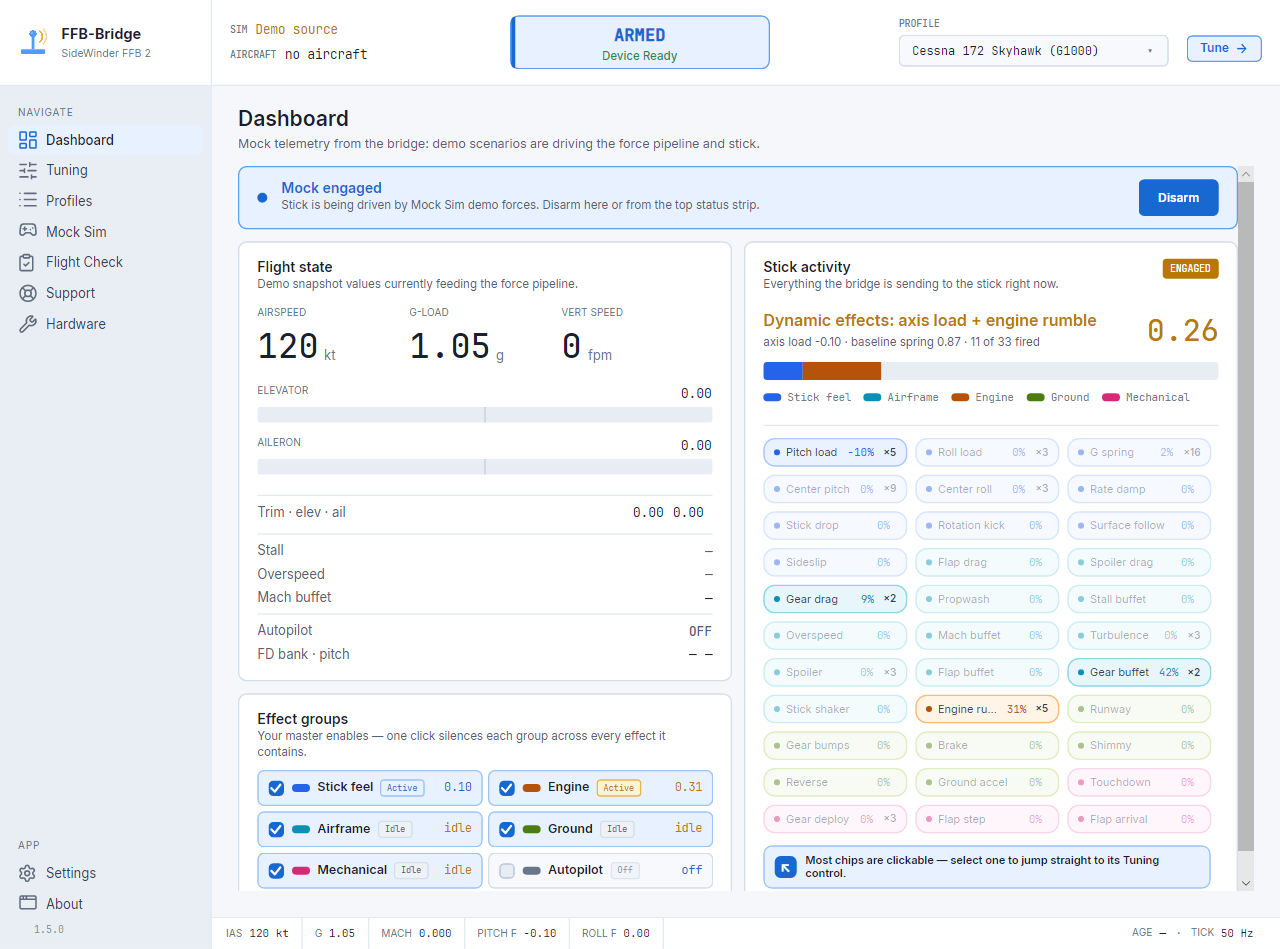
Dashboard
Flight state, active force channels, baseline spring state, and clickable channel chips that open the matching Tuning control.
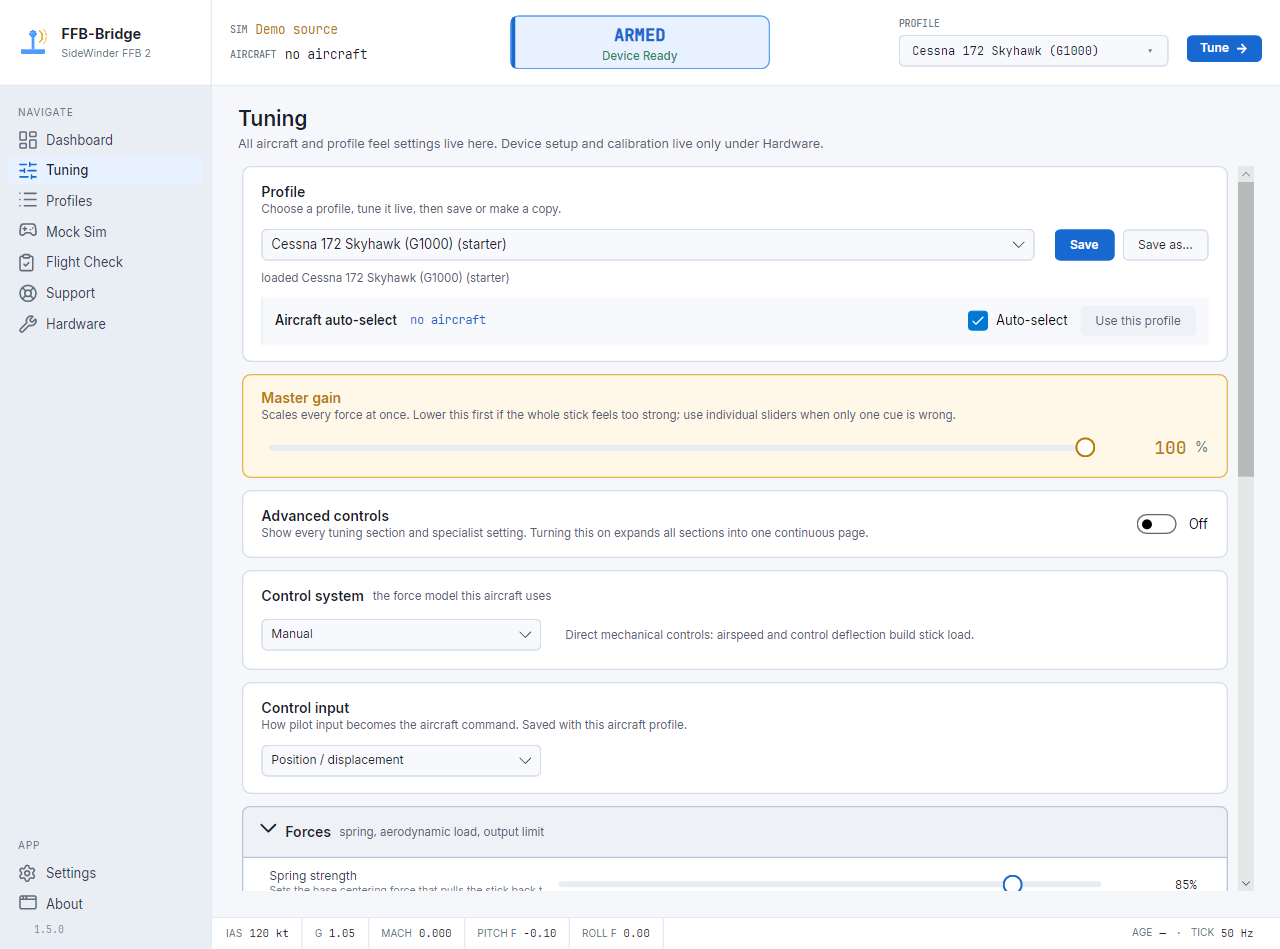
Tuning
Every slider applies on the next 50 Hz tick. Saves per aircraft.
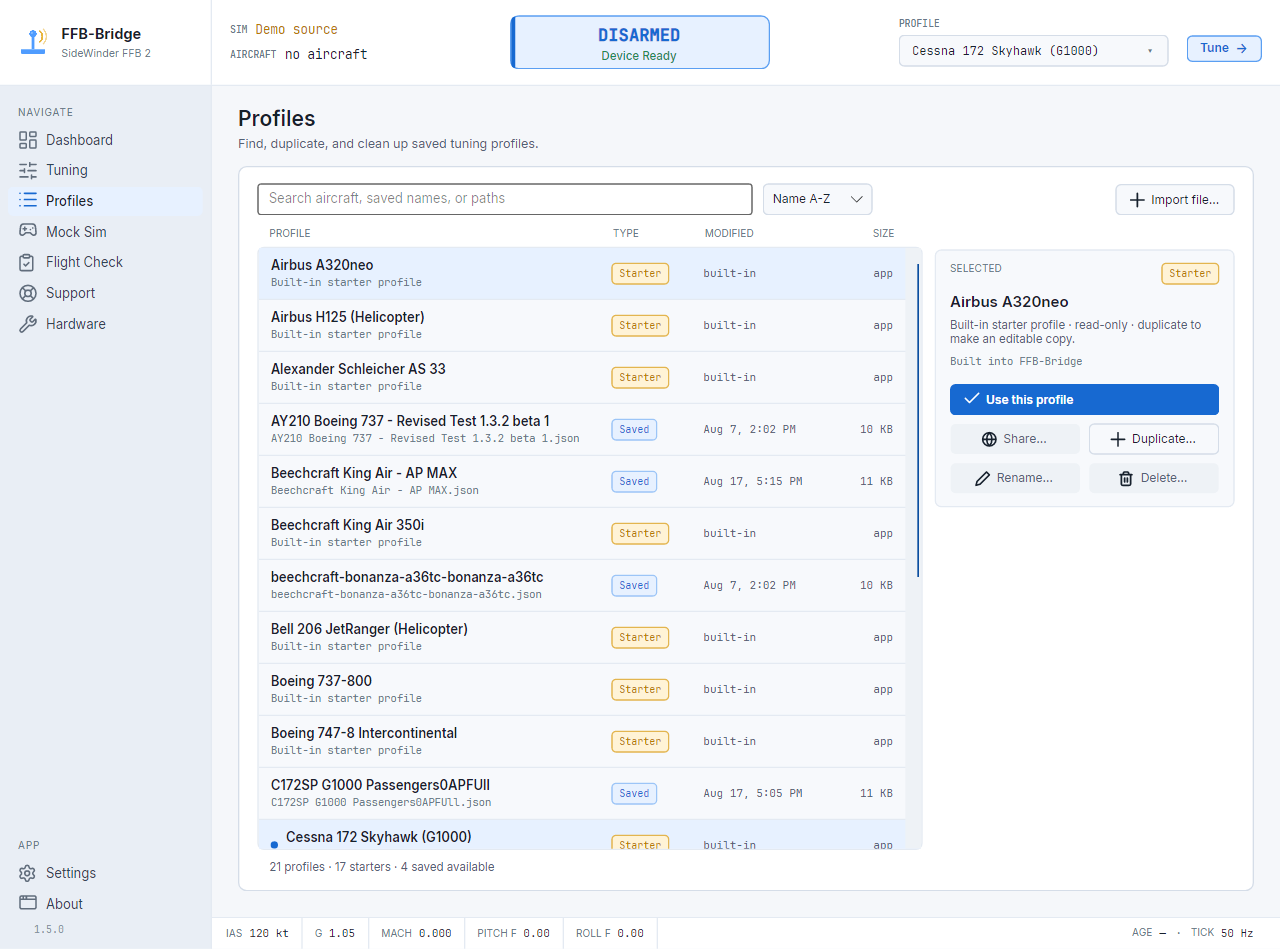
Profiles
A searchable profile library. Starters and your saved profiles live in one list, with the active profile highlighted.
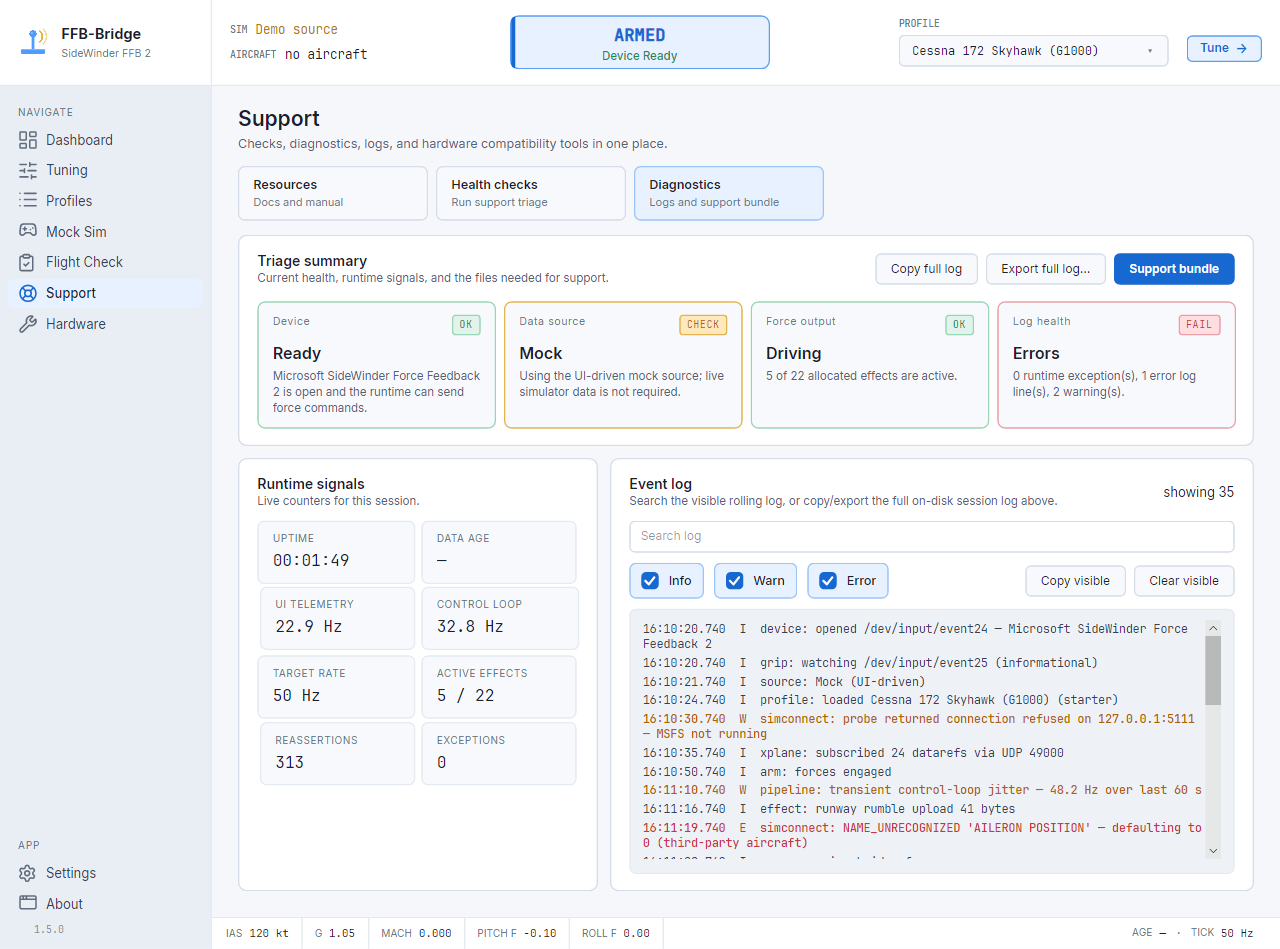
Diagnostics
Triage cards, runtime signals, searchable logs, and support-bundle export in one place.
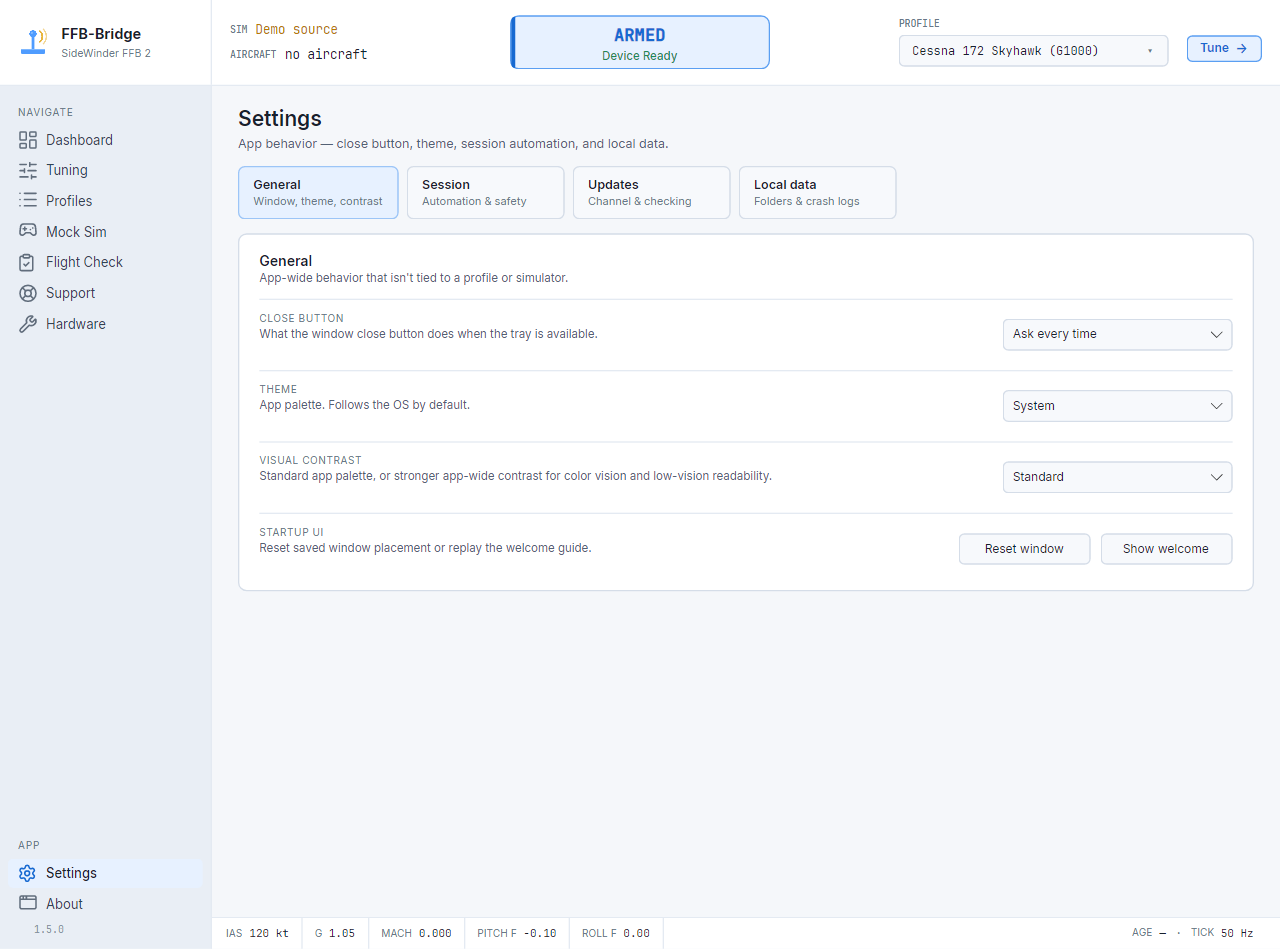
Settings
Theme, close-button behavior, session automation, and local diagnostics controls in one place.
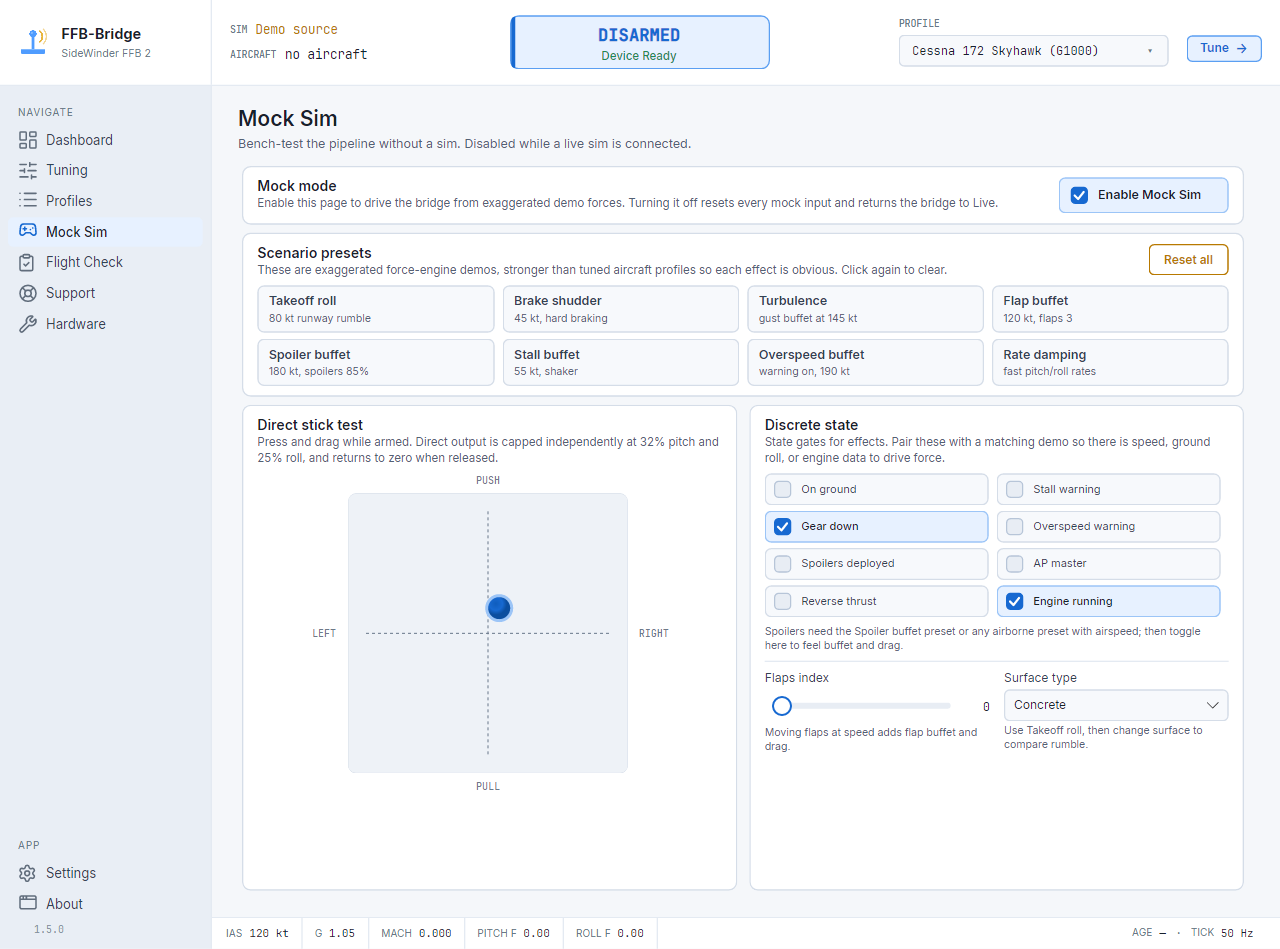
Mock Sim
Enable exaggerated demo scenarios and a direct stick test, with no sim running.
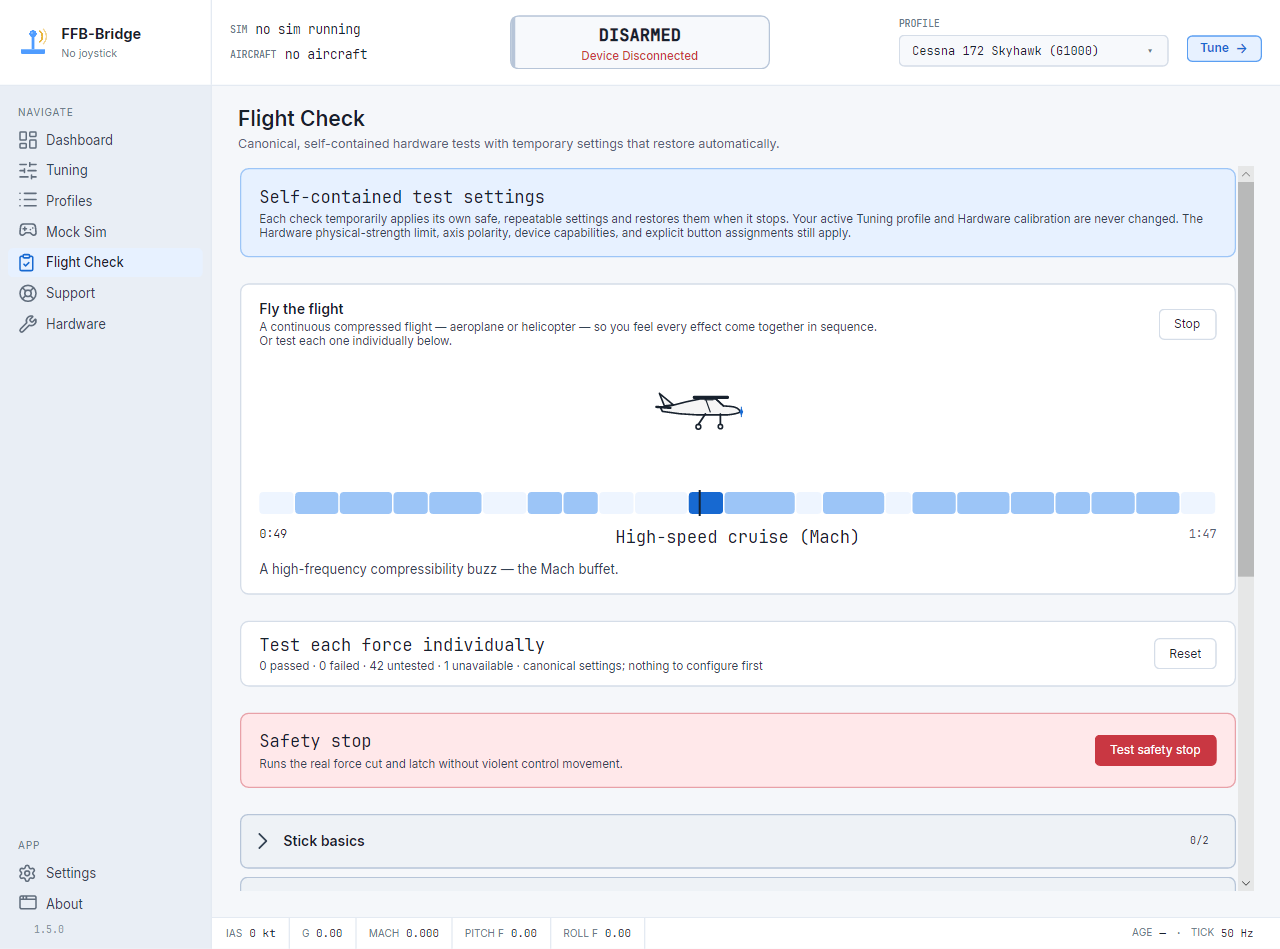
Flight Check: feel every force, and prove it's right.
This is the part of the app we had the most fun making. Flight Check turns “is my stick set up correctly?” into a quick, oddly satisfying checklist you run on the bench: press a button, feel one force, mark it Works or Doesn't. Then a little side-view aeroplane flies a whole compressed flight so you can feel everything come together — practical confidence, with a bit of joy.
- One force at a time — centring, trim, the buffets, the ground thumps — each with a plain-language note on exactly what you should feel.
- Catch a reversed axis in seconds: the stick is pushed a named direction, and if it moves the wrong way, Flight Check names the exact setting to flip.
- Finish with “Fly the flight” — an animated aircraft and timeline that play the whole sequence in order. No simulator required.
- Fly the helicopter through a complete rotorcraft force sequence.
A serious cockpit-feel engine — and it's free.
Feel the airplane
A real force model from live sim state — control-system feel (manual, hydraulic, fly-by-wire), buffets, trim, ground, and engines. Tunable per aircraft.
Explore the force model →Works with your stick
Validated across Windows, Linux, and macOS: MOZA AB6, AB9, and AY210; Microsoft SideWinder Force Feedback 2; and the Logitech Flight System G940. Also supported: the Logitech Force 3D Pro and WingMan Force 3D, Brunner FFB-G and CLS MZ (DirectX mode) bases, and the PicoWinder and Adapt-FFB-Joy adapters for the SideWinder Force Feedback Pro. Eligible unlisted joysticks remain a safe, experimental opt-in.
See what's supported →Profiles, shared
Browse and download ready-made profiles — free, no account. Share your own and talk tuning in the forum.
Open the Profile Library →Built for real eyes
A whole-app Visual contrast mode for older eyes, dim rooms, and color-vision differences — without changing your tuning.
Visual contrast →Effects the pipeline ships with.
Every value is local: no servers, no telemetry. Dial them in from the Tuning page, save as a named profile per aircraft.
Centring spring, G-loaded.
The spring pulling your stick toward neutral stiffens as G-load increases, stays present as the baseline feel, and holds a neutral spring while MSFS is paused. Adjustable base coefficient, G-gain, deadband, and clamps.
Aerodynamic loading on elevator and aileron.
Deflect the stick at cruise and feel it press back proportional to airspeed. Separate pitch and roll gains, dashboard visibility for the signed axis load, and profile presets for common airframes.
Ground effects, buffets, one-shots.
Runway rumble scaled to surface type and speed. Gear bumps and nosewheel shimmy. Brake shudder. A stall buffet that builds as airspeed decays, plus a sharp stall stick-shaker. Mach and overspeed buffets. Gear-deploy and flap-step shudders. Engine and reverse-thrust rumble. Every effect has its own gain slider and a live dashboard channel so you can see what you are feeling.
Control-system feel, per aircraft.
Pick how the controls are driven and the whole stick changes character: manual cables that load with airspeed and G, a gentler hydraulic-boosted yoke, or a constant fly-by-wire side-stick. See the full force model →
What works today.
Hardware
Validated across Windows, Linux, and macOS: MOZA AB6, AB9, and AY210; Microsoft SideWinder Force Feedback 2; and the Logitech Flight System G940. Also supported: the Logitech Force 3D Pro and WingMan Force 3D, Brunner FFB-G and CLS MZ (DirectX mode) bases, and the PicoWinder and Adapt-FFB-Joy adapters for the SideWinder Force Feedback Pro. Eligible unlisted joysticks remain a safe, experimental opt-in.
Sims
Microsoft Flight Simulator 2024 and 2020 via SimConnect TCP. X-Plane 11 and X-Plane 12 via UDP datarefs. No plugin or in-sim install; auto-detected at startup — use whichever you fly.
OS macOS new
Windows 10/11 and any modern Linux with evdev. macOS on Apple Silicon is new — X-Plane 12 with the SideWinder FFB2 and MOZA AB9 + MH16. Installers bundle the .NET 10 runtime; nothing else to install.
What beta testers are saying.
Real words from real users, each shared with their permission.
Thank you for getting FFB properly working in MSFS 2024 — that's desperately needed. I'm very impressed by the pace at which you're improving the software.
The behaviour is now absolutely perfect — I can fly straight and level hands-free. The immersion, especially in VR, is superb.
It's what I've been looking for for a long, long time — an incredible piece of software.
I'm very pleasantly surprised — I love the touchdown force. Congrats on a great program that I know will only get better.
Excellent app — worked well, and very well presented.
Congrats on the 1.0 release — it was a pleasure to be part of it.
Free at 1.0. Still free.
FFB-Bridge 1.0 is free. Every feature on this page ships to every user, forever. No trial clock, no feature flags, no asterisks.
Everything you've seen here.
- Every force effect, every slider, unlimited local profiles.
- Three sims: MSFS 2024, MSFS 2020, and X-Plane 11/12.
- Three platforms: Windows, Linux, and macOS (Apple Silicon).
- The community Profile Library — browse and download, no account.
- Visual contrast accessibility mode; light and dark themes.
- Core and Free use are local-first: no account required and no telemetry. Optional network features are separate and active only when enabled.
FFB-Bridge stays free; this is only there if you want to know who built it or help fund the work.
FFB-Bridge Pro.
We're building an optional Pro layer for pilots who want to go deeper than the defaults — something we haven't seen done with force feedback before. The open beta is testing the first Pro workflows now, and more Pro features will arrive before it ships.
There's no price yet. The beta is the first step in a larger Pro feature set. Whatever happens, the free app stays free.
Want in early? Request beta access and help shape Pro before it ships.
Explore the Pro betaHave a different force-feedback stick?
Validated across Windows, Linux, and macOS: MOZA AB6, AB9, and AY210; Microsoft SideWinder Force Feedback 2; and the Logitech Flight System G940. Also supported: the Logitech Force 3D Pro and WingMan Force 3D, Brunner FFB-G and CLS MZ (DirectX mode) bases, and the PicoWinder and Adapt-FFB-Joy adapters for the SideWinder Force Feedback Pro. Eligible unlisted joysticks remain a safe, experimental opt-in.
Free, no account, Windows and Linux. Reports stay local unless you choose to share the redacted hardware result.
Records VID/PID, driver capability flags, supported effects, and platform details.
Plays one force at a time and records what you physically felt alongside the driver's reported result.
Shared reports feed the public database so FFB-Bridge can target real hardware patterns first.
Start with the path that matches your rig.
Exact guides for supported hardware, simulator setup, operating systems, and the compatibility questions force-feedback pilots usually search for.
Microsoft SideWinder FFB2 joystick app
Start here if you are looking for the FFB2 app, then jump to your sim or operating system guide.
Open the SideWinder FFB2 joystick app hubMicrosoft SideWinder Force Feedback 2
Compatibility notes, VID/PID, naming variants, and FFB2-specific setup details.
SideWinder FFB2 compatibilityMOZA AB6 · AB9 · AY210
AB6, AB9, and AY210 support cross-platform managed configuration, and all three have validated official Autopilot Follow. Input, force output, passive mechanics, and Force Sensing are admitted per exact device and backend.
Explore MOZA supportA cyclic should hold, release, trim, and talk back
FFB-Bridge models rotorcraft as rotorcraft: stable cyclic damping, real force-trim behavior, slow beep-trim movement, and physical cues for the rotor states that matter.
Explore helicopter supportSelected Logitech FFB sticks
Selected support for the Logitech G940, Force 3D Pro, and WingMan Force 3D.
Logitech force feedback supportSideWinder FFB2 in MSFS 2024
SimConnect setup summary, force behavior, and common MSFS connection caveats.
Set up SideWinder FFB2 force feedback in MSFS 2024SideWinder FFB2 in X-Plane 12
UDP RREF setup for X-Plane 11/12, including native Linux notes.
Use the Microsoft SideWinder FFB2 with X-Plane 12SideWinder FFB2 on Windows 11
Raw HID/PID output, DirectInput fallback, SmartScreen, Smart App Control, and stability notes.
Install FFB-Bridge on Windows 11 for SideWinder FFB2SideWinder FFB2 on Linux
evdev force feedback, udev permissions, AppImage setup, and sim caveats.
Run SideWinder FFB2 force feedback on Linux with evdevFrequently asked.
Why?
Because I wanted my stick to work. I've been simming for years and always missed how good the force feedback was back in the day. Still had the FFB2 in a drawer, so I built this to make it work again.
Why do downloads start with email?
FFB-Bridge is free, but download links are still sent by email. That gives you the current Windows, Linux, and macOS links, lets us rotate stale links, and gives us a low-volume way to tell you about important updates.
The checkbox is explicit consent for the confirmation email and occasional release updates. You can unsubscribe from any email. Core and Free app use require no account and send no telemetry; optional network features are separate and active only when enabled.
Who is the developer?
FFB-Bridge is built by me, Aditya Nag, through Rohsam Inc. I have spent my adult life in technology and I am building this like real, long-lived software: signed releases, public docs, Windows, Linux, and macOS support, and a clear privacy-first approach. Learn more about me and the project.
Is this really free? What's the catch?
Yes. FFB-Bridge is truly free. I built it for my own sim setup and I want other force-feedback pilots to enjoy it too. There is no trial clock, no forced account, no app telemetry, and no current feature lock. If it helps you and you want to support the work, the Support the Dev page is there for that.
What hardware is supported?
Validated across Windows, Linux, and macOS: MOZA AB6, AB9, and AY210; Microsoft SideWinder Force Feedback 2; and the Logitech Flight System G940. Also supported: the Logitech Force 3D Pro and WingMan Force 3D, Brunner FFB-G and CLS MZ (DirectX mode) bases, and the PicoWinder and Adapt-FFB-Joy adapters for the SideWinder Force Feedback Pro. Eligible unlisted joysticks remain a safe, experimental opt-in.
FFB-Bridge identifies the device and selects its validated input, force output, effect rendering, and safety policy automatically.
If your force-feedback hardware is not listed, please run FFB Probe instead so future support starts from real device data.
Does this work on Windows 11?
Yes. FFB-Bridge supports Windows 10 version 1809 or later, including Windows 11. The SideWinder FFB2 uses the built-in HID-PID class driver, and FFB-Bridge uses raw HID/PID force output by default with DirectInput as a fallback. There is no separate Microsoft joystick driver to install.
Does this work on Linux?
Yes. Linux builds use evdev force feedback and ship as a self-contained AppImage. The Support page can install the udev rule when your user account does not yet have permission to open the joystick.
Does MSFS 2024 or X-Plane support the FFB2 directly?
Not in the way this stick needs. FFB-Bridge reads simulator telemetry, builds the force model locally, and sends force commands to the joystick. MSFS uses SimConnect TCP; X-Plane 11/12 uses UDP RREF datarefs.
Does this work with the SideWinder Force Feedback Pro?
Only through a USB adapter. The gameport SideWinder Force Feedback Pro cannot connect directly, but the open-source PicoWinder (Windows and Linux) and Adapt-FFB-Joy (Windows) adapters that put it on USB are both recognised supported devices. For other unrecognised hardware, Run FFB Probe and share the report so it can be measured properly.
Can you add my other Logitech, Thrustmaster, or adapter setup?
Validated across Windows, Linux, and macOS: MOZA AB6, AB9, and AY210; Microsoft SideWinder Force Feedback 2; and the Logitech Flight System G940. Also supported: the Logitech Force 3D Pro and WingMan Force 3D, Brunner FFB-G and CLS MZ (DirectX mode) bases, and the PicoWinder and Adapt-FFB-Joy adapters for the SideWinder Force Feedback Pro. Eligible unlisted joysticks remain a safe, experimental opt-in.
Sharing is optional. If you do share, the redacted result helps build the public hardware database and gives future FFB-Bridge support work something concrete to target.
Will my antivirus or SmartScreen flag it?
The Windows installer is code-signed by the Rohsam publisher identity. Before installing, confirm Windows shows Rohsam Inc. or RohsamInc as the publisher.
Brand-new signed builds may still show SmartScreen reputation prompts until that specific file gains download history. Only continue after verifying the source, hash, and publisher.
If your AV flags the installer outright, please email the flagged sample to supportffb-bridge.com so we can investigate.
Does it send anything over the internet?
Only when you enable or trigger a network feature such as update checks or profile sharing. Any other optional network feature is also inactive until enabled. Core force-feedback operation stays local: the app talks to MSFS or X-Plane over loopback (127.0.0.1) and to the joystick over USB.
When you export a support bundle for debugging, it's a local .zip you send to us manually if you choose.